
How to share wedding photos safely? – Back to: Secure sharing of wedding photos
This is one of the increasingly asked questions by newlyweds who want to find another way to share their wedding memories than through Facebook, Instagram or American photo cloud services. If you are wondering how to share wedding photos safely, it is because you have the desire to maintain control of your privacy.
Our service is specially dedicated to sharing family photo and video albums. All you need to do is create your private space in less than 2 minutes.
Then create your private wedding photo gallery, add your videos, customize your private wedding blog. No one but you and your guests will be able to access your posts! To learn more about our secure photo/video sharing platform, all you need to do is create your wedding blog below and let yourself be guided.

Do you want to delete your wedding photos on Facebook because of the latest 2020 hack? Discover our private platform to create your secure wedding space. Easy to use for everyone, simple to create (2 minutes maximum is enough).
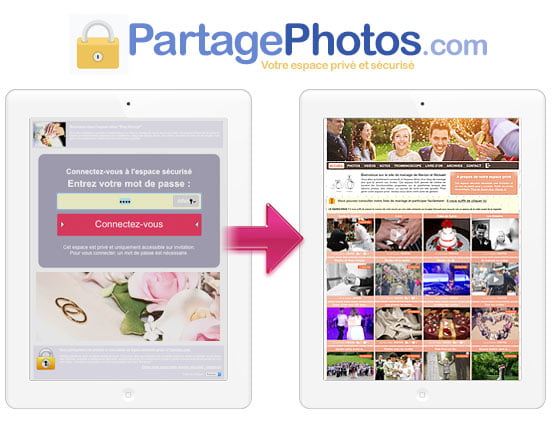
It’s your private newlywed photo sharing space that allows you to upload your wedding photo albums and all your wedding videos. Invite your loved ones to connect using a personal invitation and password. Creation is free!
You can also allow your guests to upload their photos and videos. Practical and so useful for gathering and centralizing your wedding memories within your private space.
Try the features, the options and customize your private wedding space very easily, without installing any application.
Anticipate security from the start of your wedding organization
How to share wedding photos safely? This starts well before the big day, from the planning phase. Many couples don’t think about the question until after the photos are taken, when it’s actually simpler to anticipate and prepare your sharing space in advance.
Creating your sharing space before the wedding allows you to test it, customize your privacy settings, and familiarize yourself with the available options, without the stress of last-minute changes once the festivities are over.
You can also prepare in advance the list of guests you want to invite to your space, as well as the access levels you plan to assign to them, so that everything is ready the day after the wedding.
Why a simple password is not always enough
Many newlyweds think that adding a password to their sharing space is enough to protect their memories. In reality, the security of a wedding space relies on several complementary layers, not just a single password shared with everyone.
If the same password circulates among all your guests, it becomes difficult to know who has actually accessed it, and even more difficult to revoke it without disrupting everyone if needed. This is why it is preferable to be able to create multiple distinct access points, each with its own rights.
A truly secure sharing space also allows you to control who can view, download or even publish content, rather than opening everything up once a password is known. This granularity is what makes all the difference between simple file sharing and a true answer to the question of how to share wedding photos safely.
Managing your guests’ access levels
How to share wedding photos safely? This also means adapting access according to your guests. Not all your guests necessarily need the same level of access to your wedding memories. Your parents or witnesses may want to download all the photos and videos, while more distant acquaintances may only need to view them online, without the ability to save them.
By creating multiple distinct passwords for your wedding space, you can assign different rights based on guest groups: close family, witnesses, friends, colleagues, etc. This allows you to continue answering the question of how to share wedding photos safely while precisely adapting the level of privacy to each relationship.
This fine-grained access management also prevents unpleasant surprises after the wedding, when certain more intimate or unflattering photos end up being shared well beyond the initial circle you had imagined. By anticipating these access levels when creating your space, you retain control over how your memories are shared, without having to think about it again once invitations are sent.
Disable downloads to protect your memories
Knowing how to share wedding photos safely also involves fine-grained management of downloading your albums and videos. Your guests can then view your memories directly online, without being able to save them to their phone or computer.
This feature is particularly useful for the most personal photos: preparations, emotional moments, or small group moments that you don’t want to see circulate beyond your private space. You thus maintain complete control over the distribution of your images, even after sharing them.
Conversely, for more general albums from the big day, you can choose to allow downloads so your guests can keep a personal memory of the evening. This flexibility, album by album, is precisely the answer to the question of how to share wedding photos safely without sacrificing your guests’ comfort.
Also secure photos taken by your guests
Knowing how to share wedding photos safely is not only about your own photos, but also about those taken by your guests themselves. At a wedding, it is often hundreds of additional photos that are taken by guests with their phones, outside of the professional photographer’s work.
By allowing your guests to directly upload their own photos and videos to your private space, you prevent them from being published separately on their personal social networks, which are often far less secure than your dedicated space.
This also makes it possible to centralize all of the wedding memories, whether they come from you or your loved ones, within a single protected space, rather than having them scattered across dozens of different accounts.
How long to keep your wedding space online
A question that newlyweds often ask concerns the lifespan of their sharing space. Should you keep it active for just a few weeks, long enough for everyone to retrieve their memories, or instead keep it for several years like a true archive of this special day?
There is no right or wrong answer: it all depends on how you want to use it. Some couples prefer to close their space quickly after notifying their guests, once they are certain that everyone has been able to view and download what interested them. Others choose to leave it open for the long term, to be able to return to it easily years later, or to continue adding photos from wedding anniversary parties.
In any case, keeping your wedding space online for as long as necessary does not mean giving up security: you retain the ability to modify access, remove certain guests, or completely close the space at any time from your administration interface, and continue to wonder how to share wedding photos safely for as long as you wish.
Retrieve a backup before deleting your space
How to share wedding photos safely all the way through? This also means being able to retrieve a complete backup of your memories before deleting your space. This prevents you from permanently losing photos and videos that may not exist anywhere else, especially if your guests haven’t all thought to download their copy.
A platform designed to answer the question of how to share wedding photos safely must therefore allow you to download your entire space, comments included, before any deletion. You then obtain a complete archive that you can keep on your side, with peace of mind.
This backup step, often overlooked, is nevertheless an integral part of proper management of your memories’ security: it’s better to prevent data loss than to regret it once the space is deleted.
In summary
In summary, knowing how to share wedding photos safely relies on several complementary best practices: creating distinct passwords according to your guests, fine-grained management of access levels, controlling downloads album by album, a retention period suited to your use, and systematic backup before any deletion of your space.
By applying these simple principles, you will be able to fully enjoy your wedding memories while maintaining complete control over their distribution, without ever depending on the changing policies of social networks or American storage services.
How many passwords can I create for my wedding space?
You can create as many distinct passwords as you like, each with its own access rights. This lets you precisely adjust the level of privacy for different guest groups, such as close family, witnesses, friends, or colleagues.
Can I allow some guests to download my photos and not others?
You can choose, album by album, who is allowed to download your photos and videos and who can only view them online. This flexibility gives you complete control over how your most personal memories are shared.
What happens if I want to remove a guest after the wedding?
You can revoke a guest's access at any time from your administration interface, without having to change the password for everyone else. Each access point remains independent from the others.
Can my guests add their own photos to my space?
Guests can be allowed to upload their own photos and videos taken during the wedding directly to your space. This centralizes all the memories in one place, rather than leaving them scattered across personal social media accounts.
Can I retrieve my photos before closing my space?
A complete backup of your space, including photos, videos, and comments, can be downloaded before any deletion. This ensures that no memory is permanently lost.
Other questions about: How to share wedding photos safely?
- I want to share a wedding album online with guests
- How to share wedding photos safely on Facebook
- Create an online photo slideshow for a wedding
- Easy creation of wedding photo gallery with password
- Choose a wedding photo sharing application
- How to make a private blog for your wedding
- Send wedding photos via cloud or online service
- Private wedding photo sharing application
- Is there a photo-sharing website for weddings with distant family?