
How to create a shared album? Creating shared photo albums online is now one of the simplest ways to share photos with family, friends, or loved ones. Unlike solutions integrated into iPhone, Android, or Google Photos which often cause privacy issues, there are secure and private alternatives, accessible without an account, compatible with all devices. In this guide, we explain how to create a shared photo album easily, for family or friends, without relying on iPhone, Android, or Google Photos.

How to create a shared album on iPhone, Android, or Google Photos?
On iPhone, Android, or Google Photos, shared albums mainly work between users of the same ecosystem. As soon as participants use different devices, sharing becomes more complex. An independent solution allows you to create a shared album accessible from iPhone, Android, and computer, without mandatory application. This solution is suitable both for a free shared photo album and a private album intended for family or friends.
What is a shared album?
More and more of you are wondering how to create a shared album without relying on traditional American cloud and services. Using a secure photo sharing platform allows creating albums shared by several people, while protecting privacy. Let’s see in this new article, in which context creating shared photo albums can be useful and why it is essential to avoid American sites.
 A shared album is a collection of digital photos and videos that several users can view, contribute to, and comment on. This type of album allows gathering and organizing memories in one place, accessible to all invited participants.
It is often used for family events, travel photo albums with friends, or collaborative projects, thus facilitating the sharing and distribution of visual content.
Shared albums are available on various online storage platforms such as Google Photos, iCloud, or Facebook, offering privacy control and contribution management options.
However, these American storage platforms do not offer very reliable ease of use, and file protection often leaves much to be desired (learn more about the GAFAM).
Creating a private sharing space on a European platform, GDPR compliant and offering all data protection criteria, is certainly a better choice when wondering how to create a shared album.
Alternative to iPhone/Android/Google Photos solutions
Why not limit yourself to iPhone, Android, or Google Photos?
Shared albums on iPhone, Android, or Google Photos work well… as long as everyone uses the same device. As soon as participants use different phones or computers, limitations arise: mandatory accounts, restricted access, dependence on a single platform.
Moreover, risks of changes in privacy policies can cause huge breaches, making publications public while users think they are protected.
👉 An alternative is to use an independent shared photo album, accessible from any device, without an imposed app.
Shared Album: iPhone, Android, or Google Photos vs secure platform
Shared albums on iPhone and Google Photos often require an account and are tied to a specific platform. An independent solution allows creating a private shared photo album, without an account for guests, compatible with all devices, and without data exploitation.
With iPhone / Android or Google Photos
- Mandatory account
- Limited access to users of the same ecosystem
- Data hosted on American platforms
- Features vary depending on devices
- Sometimes very risky privacy
With Partagephotos.com
- Access without account for guests
- Compatible with all devices, even older ones (no mandatory app)
- Shared albums and video posts under control
- Simple sharing with invitation and secure access by password
- Total privacy with anti-transfer / anti-download options
The advantages of a private shared photo album
A private shared photo album allows sharing photos without social networks, advertisements, and account obligation. It is accessible to the whole family, even people not comfortable with technology, from iPhone, Android, or computer.
Why prefer a secure platform?
 Is it still necessary to emphasize the importance of not revealing personal photos to everyone? Using a secure platform allows protecting access to your photo albums or videos with truly effective protection options.
The creator of the private photo sharing space can make many customizations:
- Choose who can see their photo albums
- Choose who can view their videos
- Choose to forbid or allow content downloads
- Customize the graphic appearance of their space
- Create a secure collaborative space with multiple people
- Centralize and gather different photo or video albums
Gathering photo albums but also videos
To gather photos and videos in one space on a platform like Partagephotos.com, you must first create an account and configure a shared album.
Once the album is created, you can upload your photos and videos directly from your device, without having to install a mobile app.
Then, you can invite other users to join the space by sending them an invitation link or by adding their email addresses. Guests can also add their own photos and videos, thus contributing to enriching the collective album.
The platform generally offers tools to organize files, add captions and comments, and manage privacy settings to control who can see and modify content. You can thus group several photo and video albums in a single protected space.
The advantages of a private shared photo album with Partagephotos.com
- Photo sharing without social networks
- Album accessible to the whole family, even grandparents
- No account required for guests
- Total control over photo visibility
- Usable on iPhone, Android, and computer
In which cases create a shared album?
A shared photo album is ideal for:
- sharing family photos
- creating a common vacation album
- sending photos to loved ones without an app
- centralizing memories accessible to all
Create your private collaborative space 👍
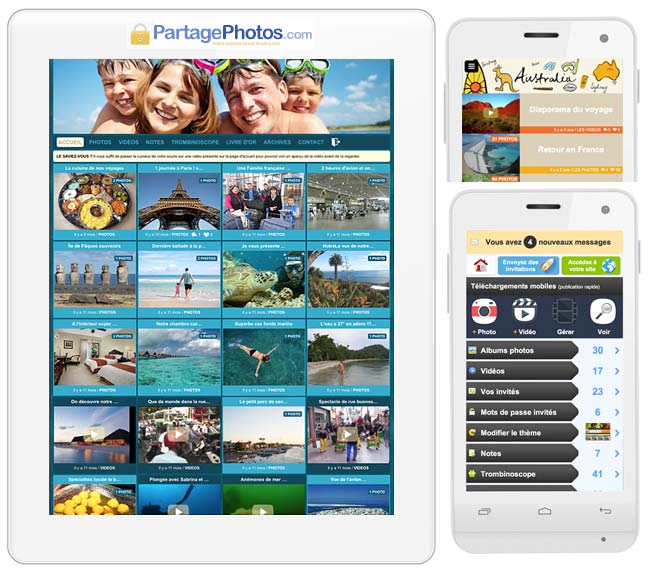
Your private and secure photo sharing space can be easily customized, either with an existing theme (family, wedding, travel, childlike, design, sober, etc.) or directly with images of your choice.
Here is an example of a personalized private family space where photo albums, videos, or “shorts,” short videos uploaded on the fly from a smartphone are shared.
No app, no ads, no use of data
You may have already guessed, our platform is completely free of advertisements or use of your personal data. As the famous saying goes, “live happily, live hidden!”
Checklist of Partagephotos advantages as well as useful features to create a private shared album:
- No mobile app to install (neither by you nor your guests)
- No link with social networks
- No advertisements, nor any sending of promotional emails
- Your guests do not need to create an account (convenient!)
- You can create links to your photo albums or videos
- The platform displays a login page for each album
- The platform displays a login page for each video
- The free version allows testing the features
- Only a few euros for unlimited storage (GB)
- No commitment or minimum duration
- Enjoy an alternative to social networks and the GAFAM!
What is a shared photo album?
A shared photo album allows multiple people to view and upload photos in the same private space.
Access is restricted to invited users only.
This makes photo sharing simple and secure.
How can I share a photo album privately?
You can share a photo album privately by inviting selected people to access it.
Only approved users can view or add photos.
The album is not public or visible on social networks.
Who can access my shared photo album?
Only people you choose can access your shared photo album.
Access is managed through private invitations or passwords.
You stay in full control of your content.
What is the difference between a shared photo album and social media?
A shared photo album is private and limited to invited users.
Social media platforms make content public or widely visible.
A shared album keeps your photos private and protected.
Can I also share videos in a shared photo album?
Yes, you can upload and share videos in a shared photo album.
Videos are stored securely alongside your photos.
Only authorized users can view them.