
Post photos online without making them public: that is the real challenge when your images are intended only for family, friends, guests or selected contacts. Social networks make publishing easy, but they are designed for visibility and circulation. If you want to post photos privately, you need a different approach: a controlled space where you decide who can view your photos and videos. In this article, we explain how to post personal photos online while limiting public exposure, controlling access and choosing a platform designed specifically for private sharing.
Why choose a secure sharing platform?

Services such as Google Photos, iCloud and Dropbox can provide restricted access to files and albums, but their primary purpose is storage and file synchronization. They are not necessarily designed to create a dedicated private publication space where photos and videos can be organized and viewed over time by an invited audience.
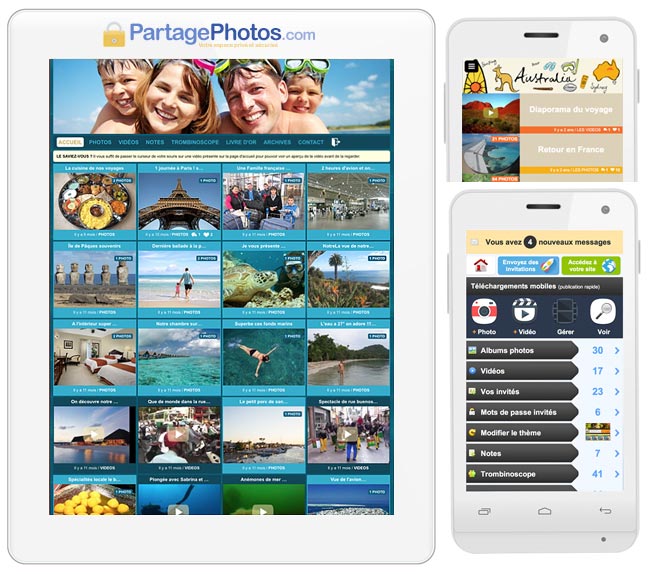
A dedicated platform such as Partagephotos.com takes a different approach. Your photos are published inside a private environment rather than on a public social network. You choose who can access the space, and your personal photos are intended for invited contacts rather than an anonymous online audience.
Depending on what you want to do, you can discover our secure space for photo and video sharing. If your objective is specifically to share photos via a link, our dedicated guide explains that method. Families looking for a long-term private space can also read our guide on how to share family photos privately.
What are the limitations of Google Photos, iCloud, and Dropbox?
Although these platforms are convenient for storing and transferring files, their purpose is different from creating a private place where you regularly post photos for a selected audience. Before choosing one of them for personal images, consider the following points:
- File sharing rather than private publishing: these services are mainly designed to store, synchronize and distribute files rather than provide a dedicated private photo environment.
- Large international ecosystems: your photos become part of broader cloud services whose business models and technical infrastructures are not specifically focused on private family or personal publishing.
- Control after sharing: once a file has been made available to another person, your ability to control what happens to that copy may become limited.
If you are comparing solutions, check this alternative to Google Photos or this WeTransfer alternative to share private photos.
How does Partagephotos.com protect your photos?
Partagephotos.com is designed around private publication rather than public exposure. When you post photos, the objective is to make them available to the people you have chosen without turning them into public content:
- Private access only: photos and videos are published inside a restricted space rather than displayed publicly on the web.
- Invitation and password: access can be reserved for the contacts you have personally authorized.
- Download controls: depending on how you configure your space, you can limit the ability of guests to download your photos and videos.
You can also browse more use cases on the blog or discover where to share photos safely.
How to protect your photos with a password?
Protecting access to your photos with a password adds an additional barrier between your private content and the public web. Instead of publishing images where anybody can discover them, you can reserve access to people who have received the information required to enter your private space. This is especially useful when you regularly post photos from family events, holidays, associations, private celebrations or other moments intended for a defined group of people.
Create a strong password
A strong password should be difficult for another person to guess while remaining manageable for you and your authorized contacts. Avoid obvious combinations based on names, birthdays or simple sequences when protecting access to a space where you post photos.
Example of a strong password: C!j7p@34M1n#
You do not necessarily need a password that is impossible to remember. A longer passphrase combining several unrelated words, numbers and characters can provide a good compromise between usability and security.
Whatever method you choose, avoid reusing the same password across multiple important accounts. A password manager can also help you create and store unique credentials without having to remember every combination yourself.
What are the risks associated with sharing private photos?
The main risk when you post photos online is losing control over the audience. A picture intended for a few people can become much more widely accessible if it is published publicly, forwarded, copied or shared from one platform to another. The objective of private posting is therefore to reduce unnecessary exposure from the beginning.
Identify potential threats
- Unauthorized disclosure: personal photos may reach people who were never part of the intended audience.
- Account compromise: weak or reused passwords can expose private content if an account is breached.
- Reuse outside the original context: once an image has been copied, it can potentially be redistributed or modified without your knowledge.
What tools can you use to restrict access to your photos?
There is no single technical tool that guarantees absolute control over every image once another person can view it. However, several measures can reduce unnecessary exposure when you post photos:
- Restricted access: publish inside a space available only to authorized contacts rather than on a public webpage or profile.
- Download controls: when available, disabling direct downloads can reduce casual copying of your photos.
Why use watermarking?
Watermarking consists of adding a visible or discreet mark to an image. It can be useful when photographers, artists or other professionals need to identify their work after posting it online. For ordinary family or personal photos, however, watermarking is rarely the most appropriate solution. Keeping the photos inside a restricted environment is generally more relevant than placing a visible mark across every personal image.
Examples of watermarking software: Adobe Photoshop, GIMP, and Watermarkly can be used when professional images require visible identification.
How to share photos safely with family and friends?
If your primary goal is family sharing rather than general private publishing, our guide to sharing family photos privately explains how to keep family memories separate from public social networks.
Use secure messaging applications?
Messaging applications can be convenient for sending a few photos directly to specific people, particularly when the exchange is temporary.
However, a messaging conversation is very different from a private photo space. Images quickly become mixed with messages, links and other discussions, making it difficult to maintain an organized collection over time.
Recipients may also save or forward content once they have received it.
For recurring publication, albums, videos and memories that you want contacts to revisit, a dedicated private environment can therefore be more appropriate than a messaging thread.
Why prefer services with download restrictions?
Download restrictions can provide an additional level of control when your aim is to let contacts view photos rather than distribute copies of the original files.
Partagephotos.com includes options that allow the owner of a private space to control how guests access photos and videos. These settings are particularly useful when you want to post photos for viewing without encouraging further distribution.
What are the best practices for posting private photos online?
By following a few simple principles, you can post photos privately online while reducing unnecessary exposure:
- Avoid publishing sensitive information unnecessarily: check what can be seen in the background of personal photos, including addresses, documents or other private details.
- Use strong and unique passwords: protecting access is more effective when credentials are not reused across multiple services.
- Keep your own backup: a private sharing platform should not be your only copy of important family or personal memories.
The most important choice happens before you upload the first image: decide whether your goal is public publication or private sharing. If your photos are intended only for selected contacts, use an environment designed for that purpose rather than publishing them first and trying to restrict their circulation afterwards.
Overall, you can post photos online without turning your private life into public content. A dedicated private space gives you a clearer separation between the people you have chosen to invite and the rest of the Internet.
Post photos without making them public
Create a private photo and video space and publish your memories only for the contacts you choose
✅ Create Your SpaceIs it legal to post photos of other people online?
In most countries, you must obtain consent before posting photos of identifiable individuals. This is especially strict for children and in professional or public contexts. Without permission, you may violate image rights or privacy laws, which can lead to legal consequences. Always ensure you have clear authorization before posting.
Can private photo links be shared without permission?
Yes, even “private” links can be forwarded by recipients. If someone has access to your photos, they can share the link or content with others. This is why relying only on private links is not enough—strong access controls and restricted sharing options are essential.
What happens to your photos after you delete them online?
Deleting photos does not always guarantee complete removal. Copies may remain on servers, backups, or even in other users’ devices if they downloaded them. Some platforms also retain data for a certain period. Always assume that once posted, content may persist.
Are cloud storage services safe for sensitive photos?
Cloud services offer convenience, but they are not always designed for strict privacy control. Files can be shared, downloaded, or accessed if accounts are compromised. For sensitive content, it’s safer to use platforms with restricted access and no-download features.
How can you prevent your photos from being reused online?
You can limit reuse by using platforms that block downloads, adding watermarks, and controlling who can access your content. Avoid public sharing and regularly review permissions. While no method is foolproof, combining these strategies greatly reduces misuse risks.
Other searches on: “Post photos”
- How to post photos privately online?
- Where can I post private photos?
- How can I post photos without making them public?
- Where can I publish personal photos for selected people?
- Is it safe to post family photos on social media?
- How can I create a private place to post photos?
- What is the best platform for posting private photos?
- Can I post photos and videos for friends only?
- How can I restrict access to photos I publish online?
- How do I post photos in a password-protected space?
Also read: Sharing photos online: what you need to know (source: National Cybersecurity Alliance)
